Reporting

Automatic PDF reporting, standard or custom

After every inspection the report is ready. You check and send, instead of writing it.

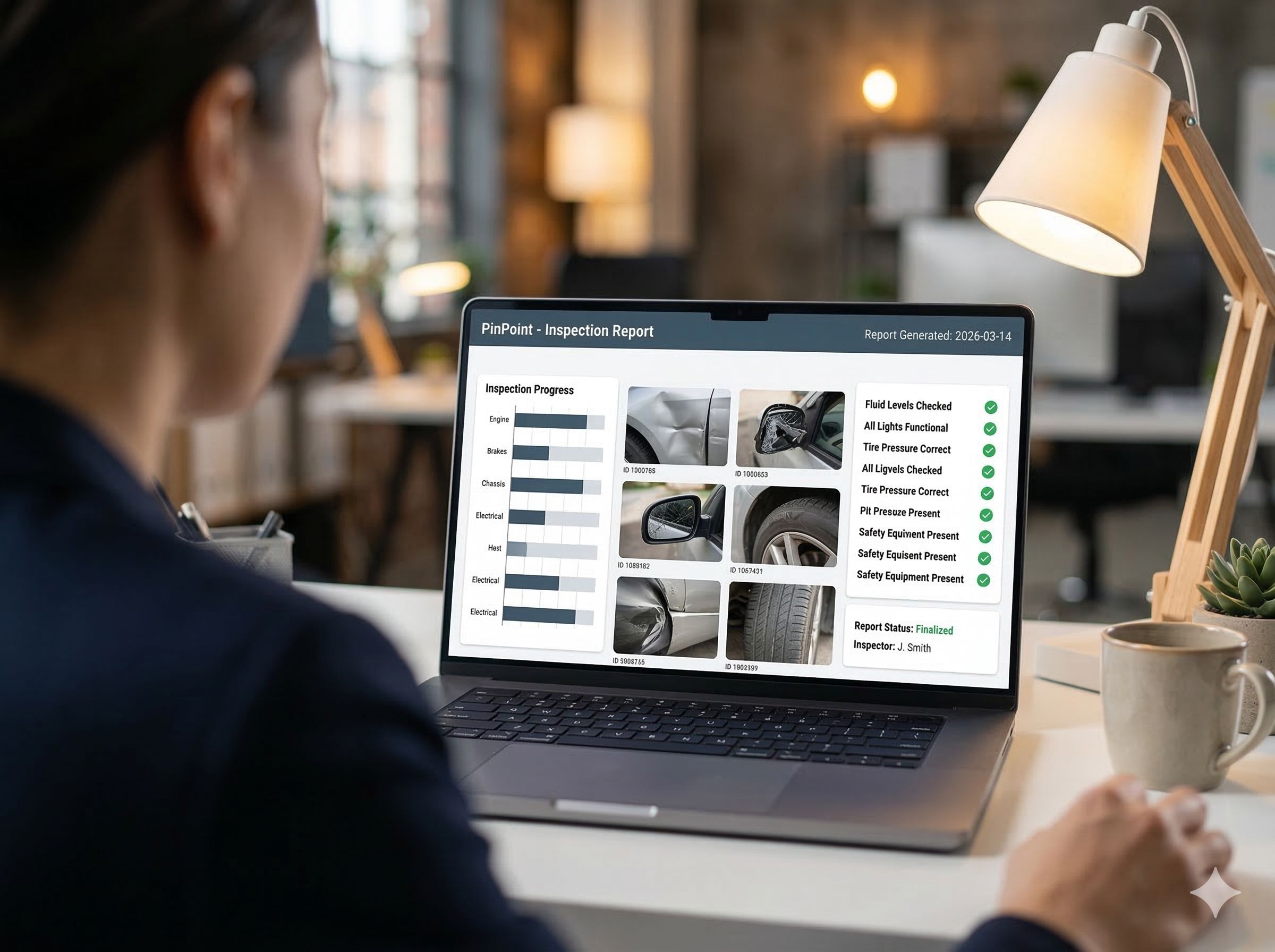
PinPoint on a laptop: findings marked on a photo, with the list of pinpoints alongside

At most organisations, writing inspection reports takes more time than the inspection itself. Looking up photos, retyping findings, tidying up the layout, and then on rereading it turns out an item is missing.

PinPoint compiles the report from what was already recorded during the inspection. Every finding goes in with its photos, the answers to the questionnaire, the place on the asset and the full status history. Nothing is retyped, so nothing can get lost in the retyping either.

Why now?

The report is what the client, management or the auditor gets to see. That is the moment when it shows whether your inspection process holds up, and it is usually also the moment when the most time is lost.
What an inspection report contains

A report per inspection round is built up of five parts. Everything comes from the record, nothing is added afterwards.

  1. 1

    Cover page in your house style

    Your logo, the name of the round, the period and who worked on it. Internal system terms do not appear; the report uses your own names.

  2. 2

    Summary

    Counts per severity and per status, and how far the round has progressed. For those who only read the first page, that is usually enough.

  3. 3

    Overview per view

    The image of the asset with all pins on it, coloured by severity. One look and you see where the problems are.

  4. 4

    Every finding separately

    With the view on which that one pin is highlighted, the severity, the status, the description, the answers to the questionnaire, the photos and the course from open to closed.

  5. 5

    Audit trail as an appendix

    Optional: the full history of who recorded or changed what, and when. That is the appendix an auditor asks for.

Standard or custom

Most organisations manage with one of the supplied templates. Anyone who needs their own layout is not stuck.

Out of the box

Thirteen templates are ready, each for a different kind of reader. You choose per round which template you use.

  • Fulleverything, with every finding worked out
  • Summarythe figures, without the detail pages
  • Managementone page, for those who steer instead of inspect
  • Per assetgrouped per vehicle, machine or part of a building
  • Per severitythe serious items first
  • Openonly what still has to be done, for the contractor
  • Photo reportimages first, text secondary
  • Compact tableeverything on as few pages as possible

Plus templates that write out the questionnaire, mark the findings on the plan and overlay the view with its pins.

Custom

The templates are HTML and CSS, and the PDF is rendered by a browser. A custom template is therefore just layout work.

  • Your house style down to the details, not just a logo in a corner
  • Your own layout and order, even if it does not resemble one of the thirteen
  • Mandatory sections required by a client or a standard
  • No proprietary report builder you have to stay within

PDF

For formal reporting. Ready to forward or archive.

Excel and CSV

When you want to do your own calculations or load it into your own system.

Power BI

For continuous follow-up instead of a report per round.

For those who report to a client

A report that fits completely, not halfway

An inspector rarely hands over for their own benefit. There is a client, a building owner or an auditor on the other side, and they have their own expectations of what a report looks like.

Most inspection software delivers a fixed structure. It fits halfway, and you do the rest by hand: rearranging chapters, adding sections your client asks for, putting the logo underneath. That is exactly the retyping work that digitising should take away.

With PinPoint the report template is set up on what you have to deliver. Your layout, your order, your sections, and the mandatory parts your client imposes. That is possible because a template is HTML and CSS and the PDF is rendered by a browser; there is no report builder you have to stay within.

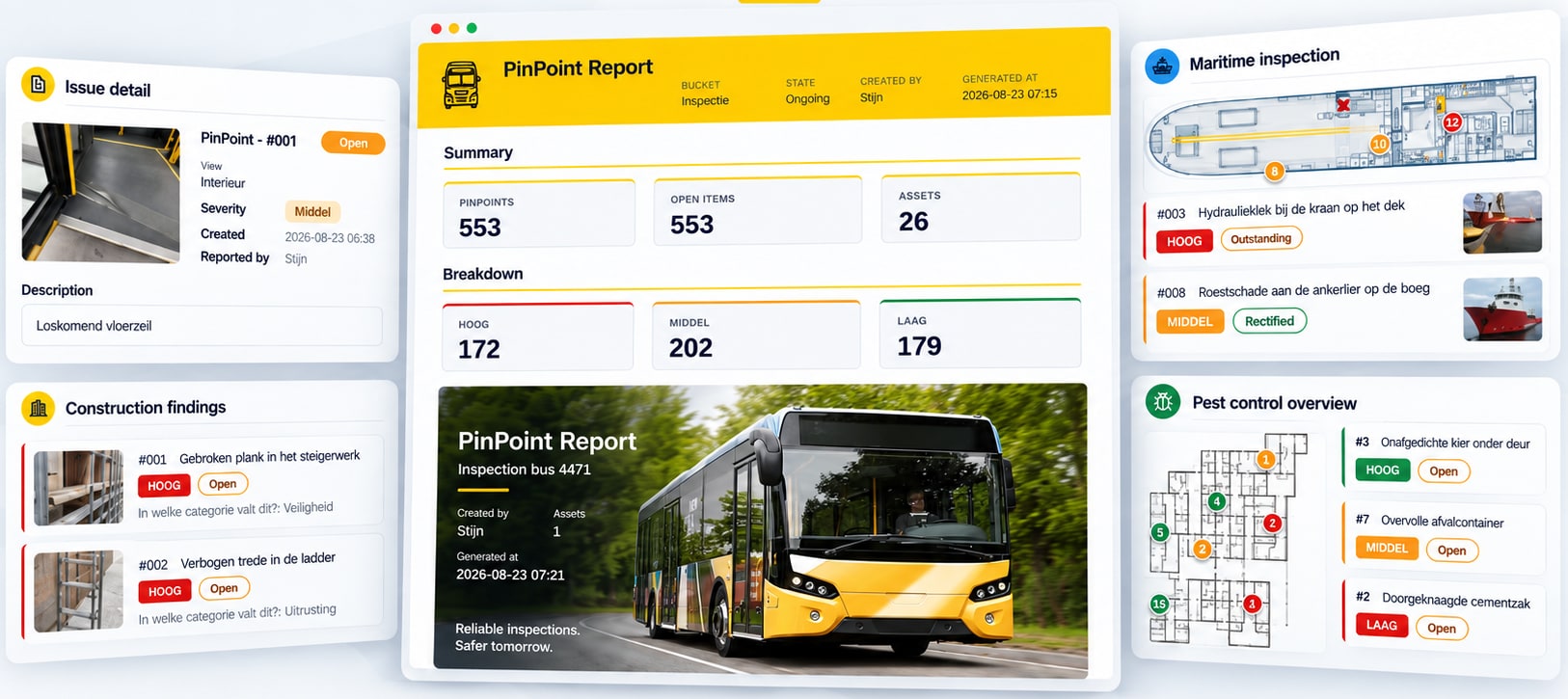
Four report formats side by side: a bus report with summary and findings per severity, a maritime inspection with items on a ship plan, construction findings with photos, and a pest control overview on a floor plan

Four sectors, four templates. The same inspection data, each time in the form the client expects.

As PDF

Ready to forward, archive or print. The form most clients ask for.

Via the portal

Rather not as an attachment in a mailbox? Then you share the report directly from the platform, so your client always sees the current version.

As data

Excel, CSV or a link to Power BI, for those who want to do their own calculations instead of reading it.

What is an inspection report?

An inspection report is the formal account of an inspection round: which assets were checked, what was found, how serious it is and what happened to it. It is the document shared with a client, management or an auditor, and the one that counts as evidence at a check that the inspection was actually carried out.

Frequently asked questions

Do I have to lay out the inspection report myself?

No. The report is compiled from what the inspectors recorded: the findings, the photos, the answers to the questionnaire and the status history. You check and send. There is no intermediate step in which someone retypes data.

Can I get a report in our own house style?

Yes. The templates are HTML and CSS, and the PDF is rendered by a browser. A custom template is therefore just layout work: your logo, your colours, your layout, your order. There is no proprietary report builder you have to stay within.

Does an old report change when we adjust the questionnaire?

No. A report uses the questionnaire as it was when the inspection round ran, not the current version. Without that rule a report from last year would look different today, and then it is worthless as evidence.

Reporting per sector

All use cases

Curious what your report would look like?

Show us your current inspection report, and we will show you what PinPoint makes of it. No obligations.