Reporting

A site diary that fills itself in

What was logged on site during the day is already in the diary by the evening. The site manager adds what only they know, instead of retyping everything.

Site manager with a tablet on site: a finding pinned on the floor plan, categorised as safety with severity high

A site diary is the daily record of a construction site: what was done, who was there, what was found and what was agreed. It is the document everyone goes back to in a dispute about delays, extra work or a defect that only shows up later.

In practice it is written in the evening, from memory and from the photos on a phone. What was already recorded during the day gets typed out a second time. And what is not typed out goes missing.

In PinPoint a finding is logged at the moment it is made: with its place on the plan, the photos, the severity, the answers to the questionnaire and who made it. A diary template puts that together per day, in the layout your site or your client uses.

What it does not do

PinPoint only knows what is logged in PinPoint. Weather, crew numbers and deliveries are added by the site manager. What becomes automatic is the part that would otherwise be retyped.
What goes into the site diary automatically

Everything comes from that day's records. Nothing is copied in afterwards from an email or a photo folder.

  1. 1

    The day's findings

    Every new finding with its description, category, severity and its place on the floor plan or view.

  2. 2

    Photos

    The photos taken with the finding, attached to the point they are about rather than loose in an appendix.

  3. 3

    Follow-up of older items

    What was fixed, verified or closed that day, and by whom. So the handling of last week's items is in today's diary too.

  4. 4

    Completed checks

    The answers to questionnaires filled in on site, such as a safety walk or a checklist at a project stage.

  5. 5

    Who logged what

    The names of the people who logged or handled findings in PinPoint that day, with the time.

In a dispute

A diary that holds up

A site diary is only worth something if nobody doubts it. A report written from memory in the evening raises questions. A record with a photo, a location and a time, made on the spot, far fewer.

A later change overwrites nothing: it is added as a new step, with who, when and why. More on the page about the audit trail and sign-off workflows.

Recorded on the spot

Time and author come from the record itself, not from a report written afterwards.

On the plan

Not only what was found, but where. The contractor walks straight to the right spot.

Nothing disappears

A closed item stays in the history, with the before and after photos.

Your layout, not ours

Every client has their own expectations of a diary, and many contractors have used the same template for years. That is why the site diary in PinPoint is a report template set up to match yours: your sections, your order, your house style. How such a template comes about is explained under custom reports.

The same goes for the safety coordinator's coordination log: the findings with date, location and follow-up that belong in it are already in PinPoint. More on inspections on site under site inspections.

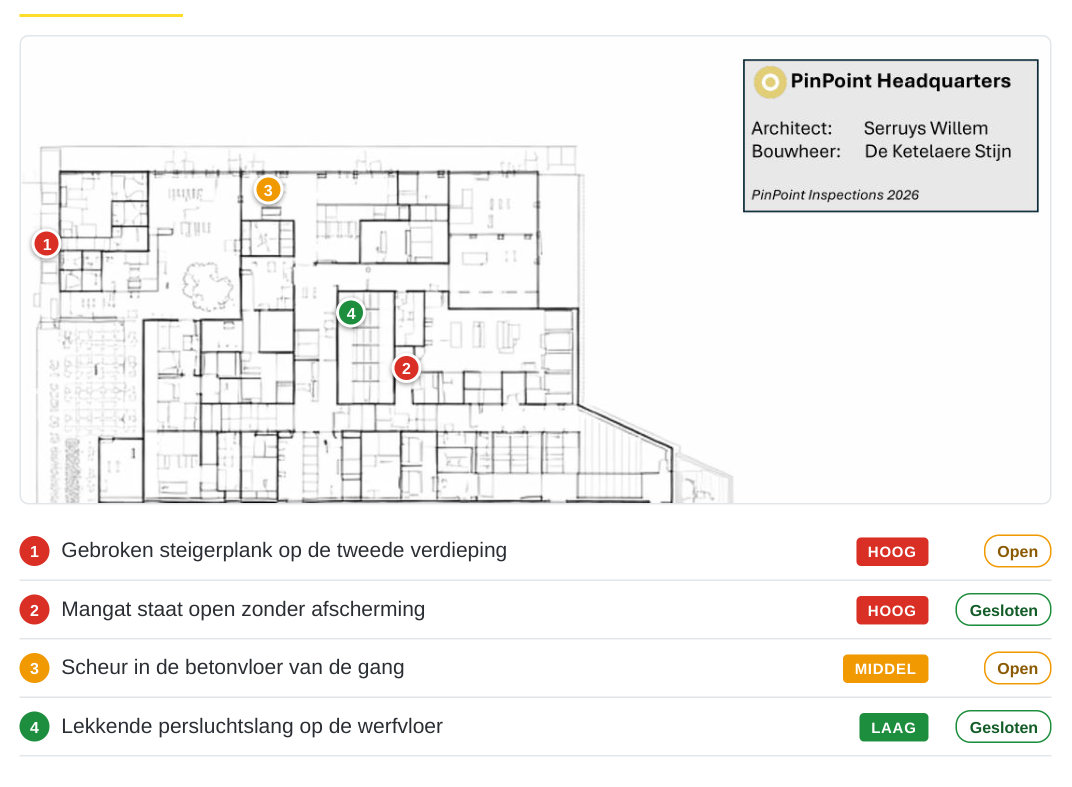
Page from the sample report: the plan of building A with four numbered pins and the list of findings with severity and status

How site findings end up in a report

A sample report of a construction site, made with demo data: three buildings on plan, ten findings with photos, four of them already closed. The same data fills the diary. The document is in Dutch.

Download the sample (PDF)

What is a site diary?

A site diary is the daily record of a construction site. For each day it records the work carried out, who was present, the conditions, what was found and which instructions were given. On public works in Belgium it is the official works diary (dagboek der werken, journal des travaux). In a dispute about deadlines or defects it is usually the first piece of evidence.

Frequently asked questions

Does PinPoint fill in the whole site diary automatically?

No, only what is logged in PinPoint: the findings with photos, the status changes, the completed questionnaires and who logged them. Sections such as weather, crew numbers and deliveries are added by the site manager. The part PinPoint fills in is exactly the part that would otherwise be retyped.

Can the diary follow our client's layout?

Yes. The diary is a report template in HTML and CSS, so the layout, the sections and the order are set up to match what your client or your own quality system asks for. Such a custom template is set up per project.

Does it work on a site without coverage?

Yes. The app works offline and syncs as soon as there is a connection. A basement or a remote site is no reason to fall back on paper.

More on reporting

Show us your current site diary

Send us a filled-in page from your diary, and we will show you which part PinPoint fills in for you. No obligations.

Last updated on